Associate Vesture With Belle Tutorial: Difference between revisions
Jump to navigation
Jump to search

No edit summary |
No edit summary |
||
| Line 1: | Line 1: | ||
{{AssociateItems|Vesture|Belle|Form:Associate Vesture With Belle}} | |||
#Name the form <BelleName>-<VestureType> including the dash, So St. Louis' Honor vesture would be "St. Louis-Honor" as the page name. (This isn't a page anyone is looking at, it's invisible linkage so that pages people do read work correctly). If pasting from a document, don't worry about special characters in Belle names as pasting them into a browser bar tends to see them handled correctly (Firefox at least). | #Name the form <BelleName>-<VestureType> including the dash, So St. Louis' Honor vesture would be "St. Louis-Honor" as the page name. (This isn't a page anyone is looking at, it's invisible linkage so that pages people do read work correctly). If pasting from a document, don't worry about special characters in Belle names as pasting them into a browser bar tends to see them handled correctly (Firefox at least). | ||
Revision as of 10:19, 12 April 2023
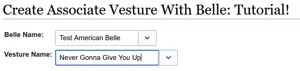
This tutorial will describe how to associate a Vesture with a Belle using the Associate Vesture With Belle form. Note that both Vesture and Belle must exist in the Cargo system in order for this to work, otherwise the drop-downs on the form will not populate!
- Name the form <BelleName>-<VestureType> including the dash, So St. Louis' Honor vesture would be "St. Louis-Honor" as the page name. (This isn't a page anyone is looking at, it's invisible linkage so that pages people do read work correctly). If pasting from a document, don't worry about special characters in Belle names as pasting them into a browser bar tends to see them handled correctly (Firefox at least).

- Type into the auto-completing text fields to find Belle and Vesture or click on the field to activate a drop-down (not recommended as the lists will both grow to very great lengths).

- Click "Save Page."